How Sophie works
How Sophie works: a live AI tutor for AP math.
Sophie helps your child learn AP Calculus through live conversation, lessons on screen, and practice on paper. She listens, explains, and reads their notebook as they work toward understanding, one step at a time.

A little structure. Room to think.
A real tutoring session, live.
30 minutes, one step at a time
Your child sits at the computer and talks to Sophie, much like they would with a private tutor. Sessions are built around 30 minutes of focused work, with time to explore a concept, try an exercise, and talk through the parts that feel difficult.
- 01
Make a plan
Start with their homework, a textbook problem, or a topic they want to understand. If your child is unsure where to begin, Sophie can help choose what to work on. Together, they build a plan around what your child needs that day.
- 02
Work it through
Your child talks to Sophie on the computer and works through the math on paper. Sophie follows their thinking, offers hints when they get stuck, and explains unfamiliar ideas. The pace can change as she sees what needs more practice.
- 03
See what clicked
After the session, a recap shows what your child practiced, what clicked, and how their skills progressed. Parents can follow that progress from their dashboard. Sophie keeps notes to help guide the next session, so the work has somewhere to go next.
More than a chat window
She follows the thinking.
Not just the answer.
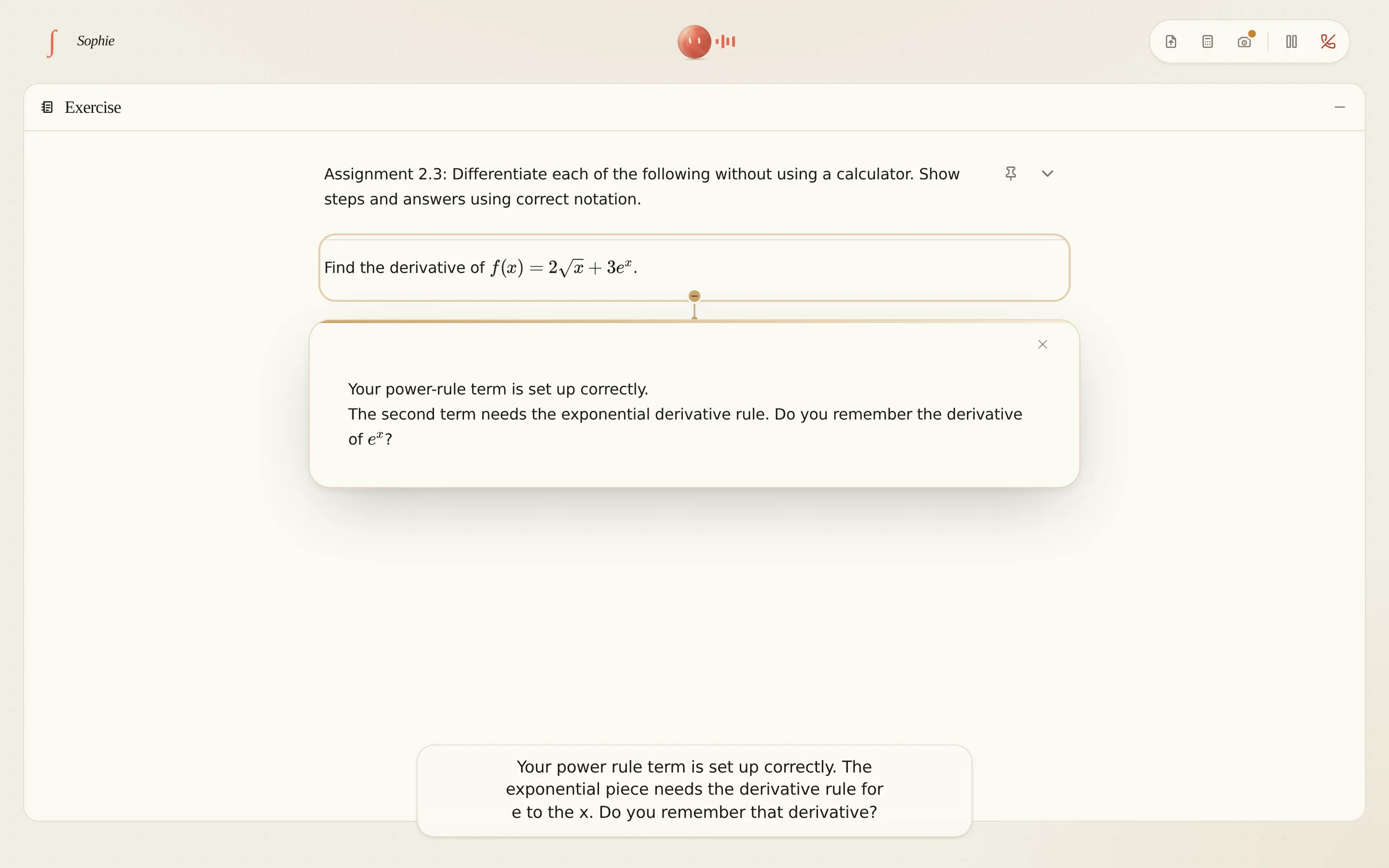
A text chatbot can respond to a typed question. Sophie brings voice, visual explanations, and a view of your child's written work into the same tutoring session. The lesson can follow what they say, what they see, and what they put on paper.
A conversation, out loud.
Your child speaks to Sophie, and she responds by voice. There is room to ask questions, think out loud, and work through an idea at their own pace. They can explain where they got stuck in their own words, then talk through the next step together. The conversation gives Sophie context beyond a final answer.
A screen that follows along.
A graph, a worked step, a new exercise. Sophie changes what is on screen as she talks, bringing the explanation into view when your child needs it. If a rule is unfamiliar, she can write a reference sheet or open a lesson. Your child can look back at the math while they try it on paper.
Real AP material. Personal teaching.
Sophie draws on a library of AP Calculus lessons and exercises, then adjusts to your child's level, speed, and skills as they work together. A student who needs to revisit a concept can spend time on the explanation. A student who is ready to practice can put it to work in an exercise.
Their notebook is part of the lesson.
An iPhone on a stand shows Sophie the handwritten work. Your child keeps doing math on paper, and Sophie can see where they need a hand. Seeing the steps helps her distinguish a misunderstanding from a mistake in the calculation. Your child practices setting out their reasoning, instead of only entering an answer into a box.
The next session starts here
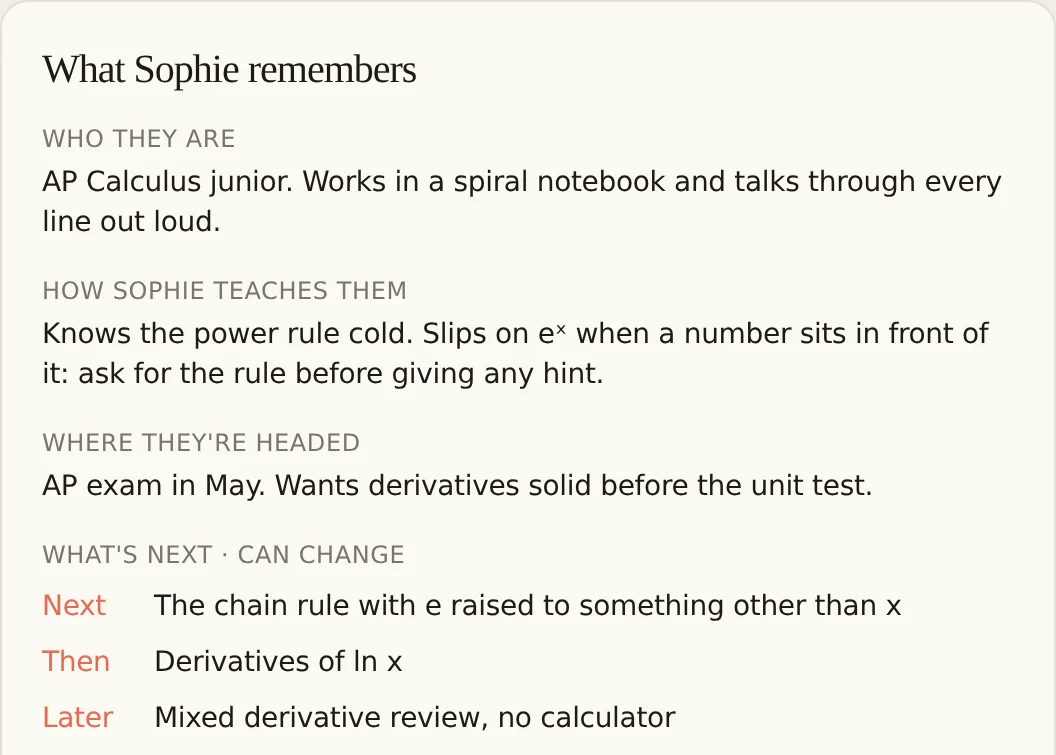
A tutor who gets to know your child.
Sophie keeps notes on how your child learns and what comes next, so each session can pick up where the last one stopped.
You can read or clear those memories anytime. The understanding they build is theirs to keep.
Before the first session
Questions parents ask.
A closer look at learning with Sophie, from setting up the desk to following your child's progress.
What subject does Sophie teach?
Sophie teaches AP Calculus, with lessons and exercises for AB and BC. Students can work on a concept they find difficult, practice a skill, or bring a question from class. The session combines explanations with opportunities to work through the math themselves.
What does my child need for a session?
A laptop for talking with Sophie, paper and a pencil for working through problems, and an iPhone on a stand to show her the page. The phone acts as a desk camera, so your child can keep writing in their notebook without retyping their work.
Can Sophie help with homework or textbook problems?
Yes. Your child can show Sophie a problem on paper through the desk camera, or share a PDF in the session. Sophie can use that material to guide the work. If they do not have a specific assignment, she can choose practice from her exercise library.
Will Sophie do the homework for my child?
Sophie is designed to help your child understand the work. She uses questions, hints, and explanations to help them take the next step, with room for them to try again. Working through the reasoning is part of the session, not just reaching a finished answer.
How can I follow my child's progress?
Your parent dashboard brings together session recaps and skill progress. You can see what your child has worked on and read the notes Sophie keeps to support future sessions. Those memories can be cleared anytime from your account.
Where can I learn about safety?
Our safety page explains Sophie's approach to working with students. You can also read our privacy policy for details about how information is handled.
Their desk. Their pace.